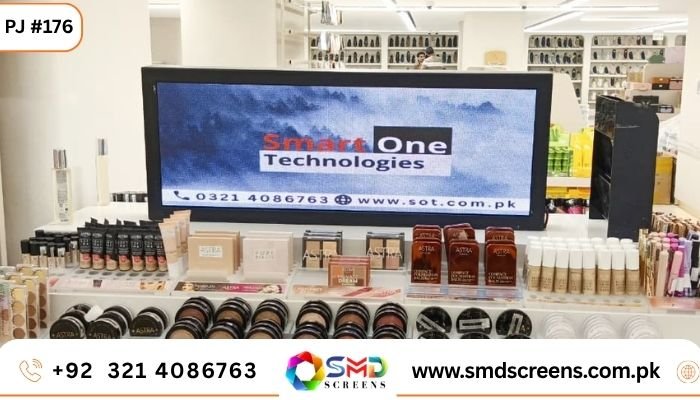
Counter Rack Indoor Display Screens Install at Chase Up, Karachi
| TL;DR — Quick Answer
Smart One Power Solution installed compact counter rack Indoor Display Screens at Chase Up in Karachi, one of Pakistan’s well-known retail chains. Each unit measures 1 x 3 feet and shows content on both the front and back, so shoppers see it from either side of the checkout counter. It’s a small install compared to a big lobby video wall, but that’s exactly the point — a screen this size sits right where the shopper’s eyes already are, showing promotions, pricing, or offers at the exact moment they’re deciding what to buy. This piece looks at why a small, dual-sided Indoor Display Screen made sense for a checkout counter, what went into building and installing it, and what other retailers can take from it. |
Not every screen has to be big to matter. A large video wall at a mall entrance grabs attention from across the room, but a checkout counter works completely differently — the shopper is already standing right there, usually for thirty seconds to a couple of minutes while their bill gets totalled. That’s a captive audience if you use it well. Chase Up, one of Karachi’s long-running retail chains, understood that, which is why they brought in Smart One Power Solution to install small, dual-sided Indoor Display Screens directly on their checkout counter racks. Each screen is just 1 x 3 feet, but it shows content on both sides at once, so it works for the shopper facing the till and the person standing just behind them in line.
Why a Checkout Counter Needed Its Own Screen
Retailers spend a lot of effort getting shoppers into the store and toward the shelves, but the checkout counter is often the most overlooked spot in the whole layout. It’s also one of the most valuable, because it’s the last moment before someone pays and leaves. A printed price card or a sticker on the counter can only say so much, and it can’t change. A small Indoor Display Screen right there can run current promotions, seasonal offers, or even simple pricing updates, all without anyone needing to reprint or replace anything by hand.
The Basics: What Got Installed
| What | Detail |
| Where | Chase Up, Karachi |
| Display type | Counter rack Indoor Display Screen |
| Screen size | 1 x 3 feet |
| Sides | Dual-sided — front and back display |
| Typical use | Checkout promotions, pricing, offers |
| Installed by | Smart One Power Solution |
Why Dual-Sided Actually Matters Here
A checkout counter isn’t a one-person space. There’s the shopper being served, and there’s usually someone next in line, standing on the other side or just behind. A single-sided screen only reaches one of them. Building the display so it shows content on both the front and the back means both people see something, without needing two separate screens mounted awkwardly around the counter. For a retail chain running dozens of checkout points across a large store, that kind of small efficiency adds up fast.
Why Size Wasn’t the Priority Here
It might seem like a 1 x 3 foot Indoor Display Screen is almost too small to bother with, especially next to something like a large-format indoor SMD screen built for a lobby or entrance. But this isn’t a lobby, and it’s not trying to be seen from across the store. It’s meant to be read from less than a metre away, by someone who’s already looking down at the counter anyway. Just like our P2.5 SMD Screen guide explains for larger indoor spaces, the right specification always comes down to how close the viewer actually stands — and at a checkout counter, that distance is about as close as it gets.
What Actually Runs on a Counter Rack Screen
- Current promotions and limited-time discounts, updated the same day they change.
- Pricing for items commonly bought at the counter, like small accessories or add-ons.
- Loyalty program details or membership offers relevant to that specific store.
- Simple branding content that keeps the counter area feeling active rather than static.
- Seasonal messaging, like holiday sales or festival-specific offers, swapped in and out easily.
Getting the Brightness Right for a Retail Counter
Checkout counters usually sit under strong overhead retail lighting, sometimes close to a glass storefront too, which means a screen here needs a bit more brightness than one tucked away in a dim office corridor. Our guide on choosing SMD screen brightness for indoor and outdoor environments covers this exact kind of decision — matching brightness to the specific lighting of the space rather than picking one setting for every install. For a busy retail counter like the ones at Chase Up, that usually means calibrating on the higher end of typical indoor brightness so the screen stays easy to read under bright store lighting without looking washed out.
Small Screens, Real Power Considerations
It’s easy to assume a screen this small barely uses any electricity, and compared to a large video wall, that’s true. But when a retail chain installs the same small Indoor Display Screen across many checkout counters in one store, or across multiple branches, the combined running cost is worth understanding upfront rather than guessing. Our breakdown of SMD screen power consumption walks through exactly how to estimate that, whether it’s one counter or fifty.
How the Installation Was Handled
A counter rack screen has different constraints than a wall-mounted display. It has to fit into a fairly tight physical footprint, stay stable on a rack that gets bumped and jostled during a busy shopping day, and still look tidy with cabling completely out of the way. Smart One Power Solution built the mounting specifically for Chase Up’s existing counter racks rather than forcing a generic bracket to fit, ran the wiring discreetly through the rack structure, and tested each unit under real store lighting before considering the job finished. It’s a smaller project than a lobby video wall, but it still needed the same attention to the actual physical space it was going into.
Why This Kind of Project Is a Good Fit for Retail Chains
Chase Up operates multiple locations across Karachi, and a checkout counter screen is exactly the kind of project that scales well across a chain like that. Once the format is proven at one counter, the same size, brightness, and mounting approach can be replicated across other branches without redesigning the whole thing from scratch each time. That consistency also makes content management simpler for the retailer, since the same promotional content can run across every counter screen in the network at once.
Why Smart One Power Solution for a Project Like This
With 15 years of experience across power systems and display technology, Smart One Power Solution doesn’t treat a small counter screen as less important than a large video wall project. The same site-first approach applies either way — check the actual space, match the brightness and mounting to it, and support the client after installation rather than disappearing once the hardware is in place. That’s the same thinking behind the company’s larger institutional work, like the Indoor SMD Video Wall installation at NAB Islamabad, just scaled down to fit a checkout counter instead of a briefing room.
What Other Retailers Can Take From This
- Don’t overlook the checkout counter just because it’s a small space — it’s one of the highest-attention spots in the whole store.
- Consider dual-sided screens wherever more than one person stands near the display at once.
- Match brightness to the store’s actual lighting rather than assuming a lower indoor setting will always work.
- Plan the mounting around your existing counter or rack structure instead of forcing a generic bracket to fit.
- Think about how the same setup could scale across multiple branches before finalising a one-off design.
How This Differs From a Standard Digital Menu Board
It’s worth separating this from something like a digital menu board, which people sometimes assume is the same kind of product. A menu board is usually one large screen mounted above or behind a counter, meant to be read from a few metres away by anyone approaching. A counter rack Indoor Display Screen sits at a completely different distance and angle — right on the counter itself, at close range, often facing slightly upward or angled toward whoever’s standing directly in front of it. The content, size, and even the mounting hardware end up being quite different once you actually plan around that shorter viewing distance.
What Made This a Straightforward Retrofit
One thing that made this particular project easier than it could have been: Chase Up’s checkout counters were already a fairly standard rack design used across their stores. That meant the mounting solution built for this installation wasn’t a one-off custom job that would need to be redesigned for every new location. Once the bracket and cabling approach were finalised for one counter, the same setup could be reused with only minor adjustments elsewhere, which keeps future installs faster and more predictable for the retailer.
Frequently Asked Questions
Why use a small Indoor Display Screen at a checkout counter instead of a bigger one?
Because the viewer is already standing close, right at the counter, a large screen isn’t necessary. A compact 1 x 3 foot display is enough to be clearly read at that distance without taking up counter space unnecessarily.
What does dual-sided mean for a counter rack screen?
It means the screen shows content on both its front and back at the same time, so both the shopper being served and the next person in line can see it, without needing two separate displays.
What kind of content works best on a checkout counter screen?
Short, simple content works best — current promotions, pricing, loyalty offers, or seasonal messaging that can be swapped quickly as offers change.
Can this kind of screen be installed across multiple store branches?
Yes. Once the size, brightness, and mounting approach are proven at one location, the same setup can be replicated across other branches of the same retail chain fairly easily.
Does a small counter screen need special brightness settings?
Often yes, since checkout counters usually sit under strong retail lighting. Brightness is typically calibrated a bit higher than a dim office space to stay clearly readable under bright store lighting.
Final Thoughts
The Chase Up installation is a good reminder that not every Indoor Display Screen project needs to be big to be worth doing well. A 1 x 3 foot, dual-sided screen at a checkout counter reaches shoppers at exactly the moment they’re paying attention, without needing a large budget or a dramatic centrepiece display. For retailers thinking about something similar, the real takeaway is to match the screen to where people actually stand and look, not to how impressive it seems on paper.
| Thinking about counter or checkout displays for your retail store?
Smart One Power Solution offers free site visits and full design and installation support for Indoor Display Screens of any size, from checkout counters to full lobby video walls, across Pakistan. |