Auditorium & Conference Hall Acoustic-Visual SMD Screens in Pakistan: Large-Scale Display Setup Guide
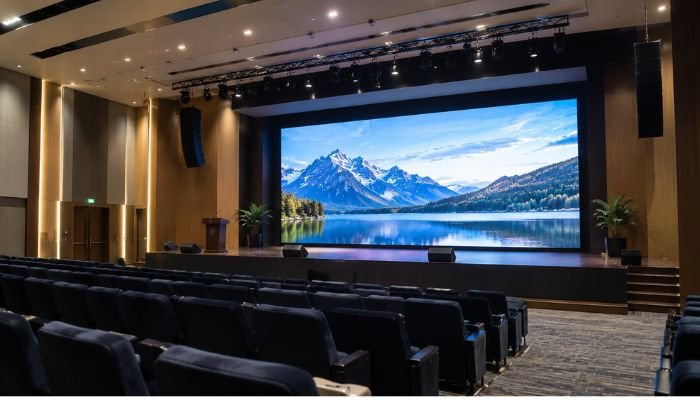
| TL;DR: Quick Answer An auditorium SMD screens in Pakistan is a large indoor LED video wall that replaces projectors in venues of 300+ seats. It stays bright and sharp with the lights on, and it can be sized so the farthest seat sits within roughly 6 to 8 times the screen height. Done well, it also stays silent, avoids sound reflections, and syncs with the audio system. |
Anyone who has sat through a conference in a hall with a washed-out projector image knows the problem. The speaker is brilliant, the slides are carefully designed, and the back half of the room squints at a grey rectangle because the house lights cannot be dimmed fully.
Across Pakistan, universities, hotels, corporate headquarters, and convention venues are replacing projectors with large indoor SMD video walls. But a big screen is not automatically a good one. An LED wall changes how the room looks and how it sounds. This guide covers how to size the screen, position it, and integrate it with your audio system so the result works for the whole audience.
Why SMD Screens Beat Projectors in Real Venues
A projector throws light onto a surface, so every bit of ambient light competes with the image. An SMD LED wall emits its own light, so contrast holds up even when the room is lit for note-taking, live camera work, or daytime events with windows.
The practical advantages for a 300+ seat venue:
- Visibility with lights on. Presenters and audience can see each other, and cameras capture better footage.
- No bulbs, no alignment drift. Projectors need lamp or laser maintenance, lens cleaning, and re-alignment. LED walls are seamless once calibrated.
- Any shape or size. Modular cabinets let you build the exact canvas your stage needs, from a standard 16:9 to an ultra-wide banner.
- Even brightness across the room. Wide viewing angles mean the side seats see nearly the same image as the centre.
- Long service life. LED modules are built for years of daily use with little image degradation.
The trade-off is upfront cost. For venues that run events weekly, hire out the hall, or stream sessions online, the lower maintenance and better image usually justify it.
Screen Sizing and Sightlines
Sizing is the most important decision in an auditorium project, and it is often done by guesswork. A better approach starts from the audience, not the wall.
Step 1: Work Out Viewing Distance
Two distances matter:
- Closest seat. Pixel pitch sets the minimum comfortable distance. As a working rule, the closest viewer should sit at least as many metres from the screen as the pitch in millimetres (a P2.0 wall suits viewers 2 m and beyond), and more distance is more comfortable.
- Farthest seat. A widely used guideline is that the farthest viewer should be within about 6 times the screen height for detailed content like spreadsheets and small text, and up to about 8 times for general presentations and video.
Example: if your farthest row is 24 metres from the stage, a screen about 3 metres tall keeps that row inside the 8x limit, and 4 metres gives comfortable margin for detailed slides.
Step 2: Choose the Aspect Ratio
| Format | Best For | Considerations |
| 16:9 | Presentations, PowerPoint, video conferencing, training sessions, most existing content | Matches standard laptop and camera output, so no scaling or letterboxing |
| 32:9 | Wide stages, concerts, panel discussions, award ceremonies, branded backdrops | Needs content designed for the ultra-wide canvas, or it will be cropped or stretched |
If your hall serves mostly slide-based events, 16:9 is the safe choice. If the stage is wide and you want a cinematic backdrop, or you need to show two sources side by side, 32:9 uses the width better. Many venues choose a 16:9 centre wall and add side confidence panels or flanking screens instead.
Step 3: Calculate Wall Dimensions from Pixels
LED walls are built from fixed pixel counts, so the maths is simple. A P2.0 wall has a pixel every 2 mm, which means:
- A 3840 × 2160 (4K) canvas is about 7.68 m wide × 4.32 m tall.
- A 3840 × 1080 ultra-wide canvas (32:9) is about 7.68 m wide × 2.16 m tall.
Matching native resolution to your source avoids scaling artefacts, so text stays crisp. Our P-2.0mm Indoor 4K SMD Video Wall is a popular starting point for halls where the front rows sit relatively close.
Step 4: Set the Height Off the Stage
The bottom edge of the screen should clear the presenters’ heads and any stage furniture, so nobody blocks the content. In most halls this means the lower edge sits roughly 1 to 1.5 metres above the stage floor, adjusted for podium height and for the sightline of the front row. If the top edge forces the audience to tilt their heads sharply upward, the screen is too tall or too close. Draw a section view from the front-row eye line to the top and bottom edges, and check the angle before ordering.
For raked or tiered seating, the rake helps. Flat floors with tall screens are the hardest, because rear rows lose the bottom of the image behind heads. In that case, raise the wall or add a secondary repeater screen halfway down the hall.
Audio-Visual Acoustic Integration
This is the part many buyers overlook, and it is where an auditorium project can go wrong. An LED wall is a large, flat, hard surface. Treat it as part of the room’s acoustics, not just its visuals.
Preventing Sound Reflection
Hard, flat surfaces reflect sound. A big LED wall sitting behind or beside loudspeakers can bounce energy back into the room, causing echo, flutter between parallel surfaces, and muddy speech.
Practical ways to manage this:
- Position speakers in front of the screen plane, or flank the wall, so sound does not hit the panel face at an angle that sends it back.
- Never place speakers behind the LED wall unless the design has been specifically engineered for it. Standard LED cabinets are not acoustically transparent.
- Treat the surrounding surfaces. Absorptive panels on side walls and the stage back wall reduce the reflections that the screen would otherwise add.
- Tilt the wall slightly where the structure allows, which prevents direct parallel reflections between the screen and the rear wall.
- Involve the acoustic consultant early. The screen position, speaker placement, and room treatment should be planned together, not in sequence.
Silent, Fanless Power Supplies
A hall with a quiet speaker, a hushed ceremony, or a live recording does not tolerate a screen that hums. Many cabinets use small cooling fans, which can add audible noise across a large wall. For auditoriums, specify fanless, passively cooled cabinets and power supplies that dissipate heat through aluminium bodies. The result is a wall that is effectively silent in operation. Good ventilation behind the screen still matters, so keep the rear service space clear and let the building’s HVAC handle the heat load.
Pakistan’s heat and unstable grid add another layer. Use quality surge protection, a stable power distribution unit, and ideally a UPS or generator changeover that keeps the wall from rebooting mid-event.
Low-Latency Processing with NovaStar
When the speaker on stage claps and the screen shows it late, the audience notices. Latency between camera, processor, and display breaks the sync between lip movement and sound, which is especially distracting for live camera feeds on IMAG (image magnification) screens.
This is where the video processor matters. NovaStar controllers and processors are widely used in the industry and are designed for low-latency operation, often keeping delay to around a single frame. Combined with an audio DSP that lets the engineer add a small matching delay to the speaker feed, you can keep picture and sound aligned for the entire hall. A good setup also provides:
- Multi-input switching for laptops, cameras, and media servers
- Seamless transitions between sources
- Preset layouts for different event types
- Reliable, flicker-free refresh for broadcast and phone cameras
Colour and Brightness Settings
Indoor walls are bright. Running one at full output in a dim hall tires the eyes and washes out the camera. A calibrated brightness range, typically adjusted lower for evening events and higher for daylight sessions, keeps the image comfortable and extends life.
Planning Checklist for Auditorium Projects
- Count seats and measure distances from the stage to the closest and farthest rows.
- Choose pitch and aspect ratio from the audience distance and your typical content.
- Check structure. Decide whether the wall is floor-stacked, wall-mounted, or flown, and confirm the load.
- Plan power and data runs with backup, and keep signal cables clear of audio cables to prevent interference.
- Review acoustics with your AV or acoustic consultant before fixing the position.
- Commission and calibrate. Colour, brightness, and sync should be tested with real content and with the sound system running.
- Train your operators. The best installation fails if the staff cannot switch sources confidently.
Choosing a Partner in Pakistan
Whether your venue is in Lahore, Karachi, or Islamabad, a large-scale indoor display is a long-term investment. Look for a supplier who offers on-site surveys, clear warranty terms, local spare parts, and installation experience in halls of your size. Ask to see completed auditorium projects and to speak with the engineers who will commission the system, not only the sales team.
You can browse our wider range of display solutions on the SOPS home page, or see the specifications of our P-2.0mm Indoor 4K SMD Video Wall before the survey.
Frequently Asked Questions
What is the best pixel pitch for an auditorium?
It depends on the closest seat. P2.0 suits halls where the first row is a few metres from the wall. Larger pitches work for deeper venues where viewers are farther away.
Can an LED wall replace a projector in a 300-seat hall?
Yes. It stays clear with lights on, needs no lamp changes, and can be sized to the stage.
Will an LED screen affect my hall’s acoustics?
It can, because it is a hard, flat surface. Careful speaker placement and acoustic treatment around the wall prevent problems.
Are LED walls noisy?
Fanless cabinets and passive cooling make the wall silent in operation.
Get a Free Survey and Design Proposal
Every hall is different, and the best way to avoid costly mistakes is to measure first. We offer a complimentary auditorium site survey and an acoustic-visual design proposal covering screen size, pitch, mounting, power, and audio coordination for your venue.
Call or WhatsApp: +92 308 4666059
Or share your hall dimensions and seating plan through our Contact Us page.
Plan the screen around your audience, and every seat becomes the best seat.