Conference Room & Executive Boardroom LED Video Walls in Pakistan: Hybrid Meeting Display Setup Guide
| TL;DR: Quick Answer A conference room LED video wall in Pakistan is a fine-pitch indoor display, typically P1.25 to P1.8, built from seamless cabinets. Unlike projectors, it stays sharp in ambient daylight, so blinds can stay open. It connects by HDMI to Zoom or Microsoft Teams room systems, with the camera sitting above or below the wall, giving remote participants a natural eye line. |
Picture a board meeting at 2 p.m. The blinds are half-drawn because the projector cannot compete with the afternoon sun, half the table is squinting at faded charts, and the colleague joining from Dubai is a small face in a corner of the screen. Nobody says anything, but everyone feels the meeting is working against the room.
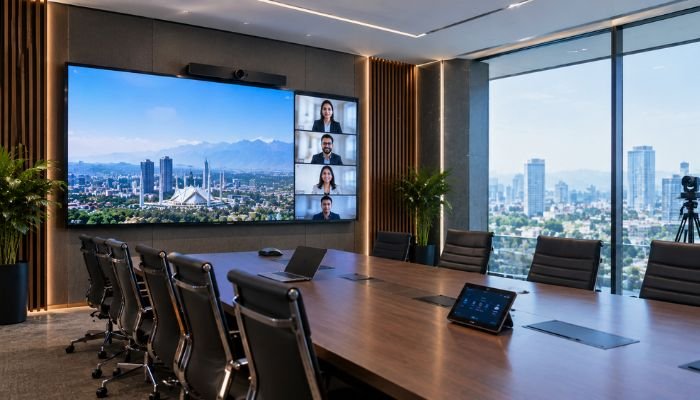
Across Lahore, Karachi, and Islamabad, companies are fixing this by replacing projectors and large LCD panels with fine-pitch LED video walls. The change is not just cosmetic. A well-designed wall makes presentations clearer, hybrid calls more natural, and the boardroom itself look like it belongs to a serious business. This guide explains how to choose the right pixel pitch, size the wall for your room, and connect it to the tools your team already uses.
Why LED Beats Projectors in the Boardroom
A projector reflects light off a surface, so any ambient light competes with the image. An LED wall emits its own light, so it keeps its contrast and colour even in a bright, window-lit room.
The practical gains for a meeting room:
- Daylight-ready. Blinds can stay open, which keeps the room comfortable and makes video calls look better.
- Seamless canvas. There is no bezel grid, as on a tiled LCD wall. Charts and diagrams run edge to edge without lines through them.
- No lamp, no alignment. There are no bulbs to replace, no lens drift, and no warm-up wait before the meeting begins.
- Custom proportions. Cabinets are modular, so the wall can match the room instead of a standard TV size.
- A premium look. A flush, glowing wall signals a modern, confident company to every client who walks in.
The honest trade-off is cost. Fine-pitch LED costs more upfront than a projector or a large commercial panel. For boardrooms used daily, and especially for rooms where first impressions matter, many firms find it worthwhile.
Viewing Distance and Resolution Sizing
Pixel pitch is the distance in millimetres between the centres of two neighbouring LEDs. A smaller pitch packs more pixels into each square metre and lets viewers sit closer without seeing individual dots. Conference rooms use the finest pitches because people sit relatively near the screen.
Step 1: Measure the Room and Table
Start with two numbers: the distance from the wall to the nearest seat, and the distance to the farthest. A useful working rule is that the closest viewer should sit at least as many metres away as the pitch number in millimetres, and more comfortably at two to three times that. For the farthest seat, keep it within roughly 6 to 8 times the wall height so small text stays readable.
Step 2: Match Pitch to Layout
| Pixel Pitch | Pixel Density | Comfortable Viewing | Best Room Type |
| P1.25 | About 640,000 px/sqm | 2 to 6 m | Executive boardrooms and small meeting rooms where the first seat is close to the wall |
| P1.53 | About 420,000 px/sqm | 2.5 to 8 m | Mid-size conference rooms with a standard 10 to 14 seat table |
| P1.8 | About 310,000 px/sqm | 3 to 10 m | Larger rooms, training spaces, and long tables where a bigger wall suits the budget |
Viewing ranges are guidelines. Content type and your own comfort standards will shift them slightly.
A rule of thumb: if the first seat is within 2 metres of the wall, go P1.25. If the table is long and the nearest person sits at 3 metres or more, P1.53 or P1.8 saves budget without a noticeable drop in clarity.
Step 3: Size the Wall
LED walls are built from fixed pixel counts, so the dimensions follow from the resolution you want to display. Matching native resolution to your source avoids scaling and keeps text crisp.
| Canvas | P1.25 wall size | P1.8 wall size |
| Full HD (1920 × 1080) | 2.40 m × 1.35 m | 3.46 m × 1.94 m |
| 4K (3840 × 2160) | 4.80 m × 2.70 m | 6.91 m × 3.89 m |
Most boardrooms are comfortable with a Full HD canvas on P1.25, which gives a wall about 2.4 metres wide. Larger rooms or those showing detailed spreadsheets benefit from 4K. Mount the bottom edge roughly 0.9 to 1.1 metres above the floor, so the image sits at natural eye level for seated participants and the top of the wall stays comfortable to read.
Hybrid Meetings: Zoom, Teams, and Camera Placement
Hybrid meetings succeed or fail on eye contact and audio. An LED wall helps because it can show remote participants at life-like scale, but the camera has to be placed properly.
- Mount the camera at the centre line, just above or below the wall, so remote participants see the room facing them rather than glancing sideways.
- Use a conferencing room system. Zoom Rooms and Microsoft Teams Rooms systems connect to the wall through standard HDMI. The wall behaves as a large display, and the room system handles camera, microphones, and speakers.
- Pair it with a proper speakerphone or ceiling microphones. Good audio matters more than screen size for call quality.
- Choose a high refresh rate. Fine-pitch walls with a high refresh rate avoid flicker and banding when the camera captures the display, which matters when the wall shows content that remote guests also see.
- Keep brightness sensible. Indoor walls are bright. A calibrated, moderate output protects eyes during long meetings and prevents a harsh glow on camera.
Wireless Collaboration and Multi-Device Casting
A beautiful wall is wasted if connecting a laptop takes ten minutes. Modern boardrooms plan the input side as carefully as the display.
Wired for Reliability
Keep at least one HDMI or USB-C input on the table as a fallback. Wired is the most dependable option when an important presentation cannot fail.
Wireless for Convenience
For everyday use, a wireless presentation system lets people share their screen without cables. Typical options include:
- Wireless presentation gateways that accept laptops and phones with a button or app
- Built-in casting through AirPlay, Miracast, or Google Cast on a connected media box
- A dedicated room PC running Teams or Zoom, so participants simply join the call
A good controller or video processor also lets you split the wall into zones. You might show a presentation on the left and the remote participants on the right, or display two laptops side by side during a review. Save these layouts as presets, so staff can switch with one tap instead of configuring settings mid-meeting.
Finally, remember the practical details: HDMI and network cabling hidden in table boxes, a small tablet controller for non-technical users, and a short guide in the room so any staff member can run the system.
Planning Checklist
- Measure the room and the distances from the wall to the nearest and farthest seats.
- Choose the pitch from the closest viewing distance and your budget.
- Pick the canvas: Full HD for most rooms, 4K for larger spaces or data-heavy content.
- Plan the camera and audio position with your video conferencing setup.
- Design the input layout: wired fallback, wireless casting, and saved presets.
- Check power, ventilation, and mounting, since the wall needs a solid structure and a stable supply.
- Commission and train, so the team uses the system confidently from day one.
Choosing the Right Partner in Pakistan
Whether your office is in Lahore, Karachi, or Islamabad, ask suppliers for a mockup of the wall in your actual room, clear warranty terms, local spare parts, and examples of completed boardroom installations. You can explore our dedicated Conference Room page for configurations and specifications, or browse the full range from the SOPS home page.
Frequently Asked Questions
What pixel pitch is best for a conference room?
P1.25 to P1.8 covers most rooms. Choose P1.25 when seating is close to the wall, and P1.53 or P1.8 for longer tables.
Will an LED video wall work with Zoom and Microsoft Teams?
Yes. It connects as a standard display through HDMI, so Zoom Rooms and Teams Rooms systems work normally.
Can I use it in a room with large windows?
Yes. LED emits its own light and stays clear in ambient daylight, unlike most projectors.
Can several people share their screens wirelessly?
Yes, with a wireless presentation gateway or casting system, and the wall can show multiple sources at once.
Get a Free Consultation and Display Mockup
The easiest way to judge a boardroom wall is to see it in your own room. We offer a free on-site corporate consultation and a conference display mockup showing the wall size, pitch, and layout in your space before you commit.
Call or WhatsApp: +92 308 4666059
Or send your room dimensions through our Contact Us page.
Make every meeting look as good as the work behind it.